
How to Create Field Force Management Software: A Complete Guide for Modern Businesses
Quick Answer
Field force management software helps businesses track and manage teams that work outside the office. It records staff location through GPS, marks attendance, assigns tasks, and reports each day’s activity, so managers can see who did what and where. To create it, define the roles and workflows you need to track, choose the features, pick a technology stack, build and test a mobile app and a manager dashboard, then launch it in stages. By Mr. Sumeet Katariya, CEO, Accucia Softwares Pvt. Ltd.
Businesses that rely on field employees, technicians, service engineers, or sales teams often struggle with operational visibility. Managing a distributed workforce using spreadsheets, phone calls, or manual reporting leads to delays, inefficiencies, and lost productivity.
This is where Field Force Management Software becomes essential.
A well-designed field force management system helps businesses track field staff, assign tasks, manage service operations, and monitor productivity in real time. In this guide, we will explore how to create field force management software, the key features it should include, the technology stack required, and how businesses can implement a scalable solution.
Where service margin leaks
Margin leaves a service business through six doors, and five of them are information problems, not effort problems.
The wrong technician arrives. The job needed a controller fault diagnosis and the nearest available person is a rope and door specialist. Scheduling that weighed distance and ignored skill.
The part is not on the van. Diagnosis takes twenty minutes, the trip takes ninety, and the fix waits nine days for a component that was sitting in the branch store the whole time.
Nobody can see the asset's history. The same door operator has failed four times in eight months. Each visit was logged against a fresh complaint number, so the pattern never surfaced and the root cause was never fixed.
AMC renewals go unchased. A contract lapses quietly, the customer keeps calling, and your team keeps attending for free until somebody notices at year end.
Warranty is not tracked against the component. You replace a part the manufacturer would have replaced, and eat the cost.
And the sixth door, the one that is not an information problem: the technician closed the job without testing it properly because the next call was already waiting.
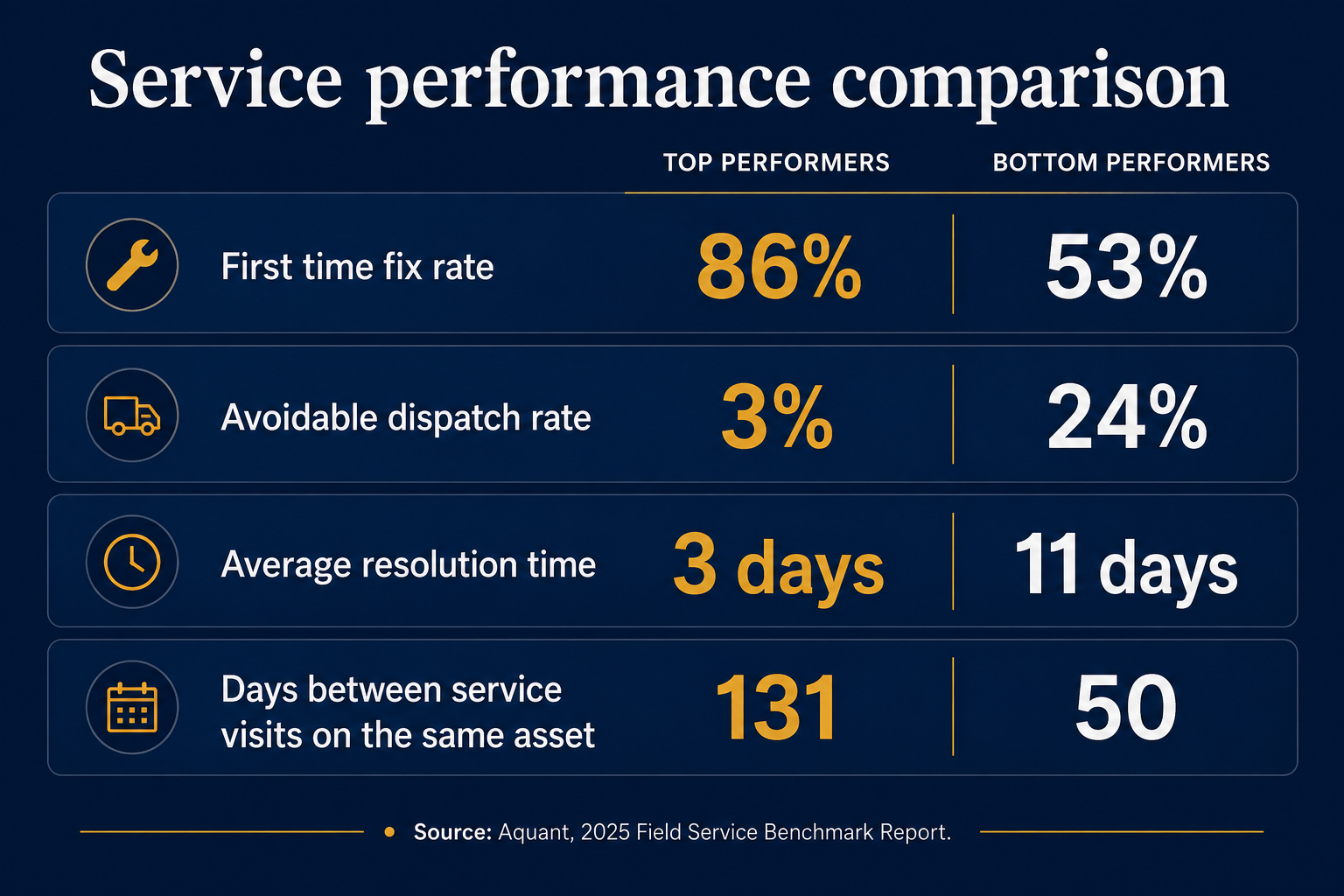
Aquant's 2025 Field Service Benchmark Report, built from nearly 160 service organisations and over 600,000 technician service records representing $9.5 billion in service costs, found that 14% of truck rolls, one in seven onsite visits, are unnecessary. Top performers hold a first time fix rate of 86%. Bottom performers sit at 53%.
First time fix rate
Top performers: 86%
Bottom performers: 53%
Avoidable dispatch rate
Top performers: 3%
Bottom performers: 24%
Average resolution time
Top performers: 3 days
Bottom performers: 11 days
Days between service visits on the same asset
Top performers: 131
Bottom performers: 50
The five things field service management software has to get right
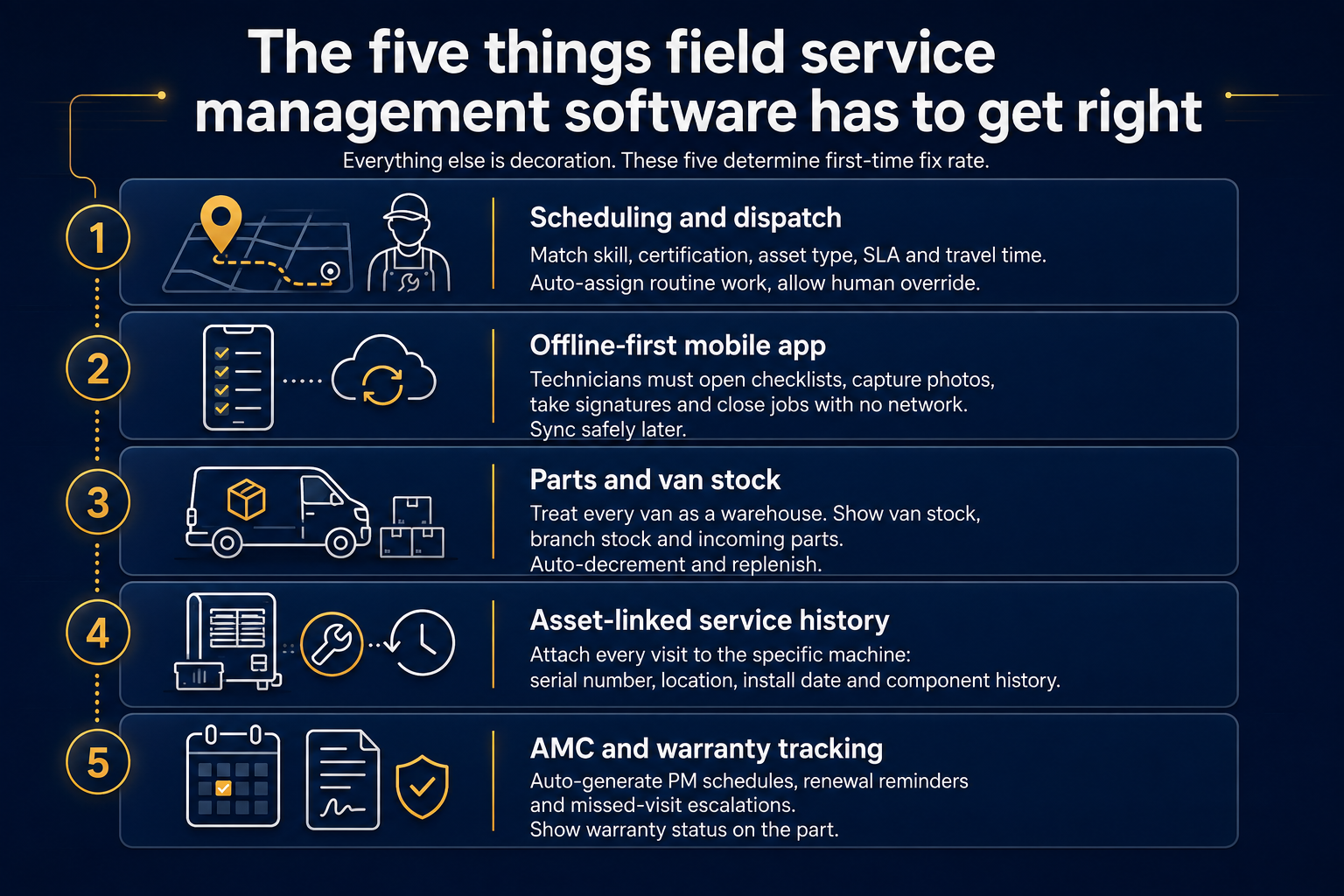
Everything else is decoration. If a product does these five well, it will move your first time fix rate. If it does four, it will not.
1. Scheduling and dispatch that knows skills, not just distance
Assignment has to weigh skill code, certification status, the asset type, the SLA clock and travel time together. A dispatcher looking at a map with pins is guessing. The useful version shows who can actually close this fault, ranked, with the travel cost of each choice. Auto-assign for routine work, human override for the hard calls, always.
2. A mobile app that works with no network
This is where most implementations die. Machine rooms are in basements. Lift shafts and pump houses have no signal. If the technician cannot open the checklist, photograph the fault, capture the customer signature and close the job offline, the app becomes paperwork done twice. Treat offline-first with a conflict-safe sync queue as the entry requirement, before you look at anything else on the feature list. FieldTech, an HVAC and home services platform we built, was designed offline-first on Flutter for exactly this reason. You can read the build detail in the FieldTech case study.
3. Parts and van stock the technician can actually see
Every van is a warehouse. Treat it as one. The technician needs to see what is on their van, what is at the branch, and what is on the way, before they drive. The reverse flow matters just as much: parts consumed on a job should decrement van stock automatically and trigger replenishment, or your stock figures are fiction within a month.
4. Service history attached to the asset
Not to the customer. Not to the complaint. To the specific machine, with its serial number, location, install date, component list and every visit ever made to it. This is the single change that turns a call log into an engineering record.
5. AMC and warranty tracking that chases itself
Contracts should generate their own preventive maintenance schedule, their own renewal reminders at 90, 60 and 30 days, and their own escalation when a visit is missed. Warranty status should be visible on the part, at the moment the technician selects it. If a human has to remember, it will be forgotten.
What is Field Force Management Software?
Field Force Management Software is a digital platform that helps businesses manage employees who work outside the office. It provides tools to schedule tasks, track employee locations, collect reports, and monitor performance.
Companies across industries such as elevator maintenance, facility management, logistics, telecom, utilities, and service-based businesses use field force software to improve operational efficiency.
Key capabilities typically include:
- real-time employee tracking
- task assignment and scheduling
- attendance management
- service reporting
- communication between office and field staff
- analytics and performance tracking
Why Businesses Need Field Force Management Software
Traditional field workforce management methods often create operational challenges.
Lack of Real-Time Visibility
Managers cannot easily track where technicians or sales teams are working.
Inefficient Task Allocation
Manual scheduling leads to delays and missed service appointments.
Poor Communication
Field employees and office teams struggle to coordinate effectively.
Limited Performance Monitoring
Without digital reports, it becomes difficult to measure productivity and service quality.
By implementing field force automation software, companies can streamline operations and gain full visibility into their workforce.
Essential Features of Field Force Management Software
To build an effective field workforce management system, the platform should include the following features.
Task Assignment and Scheduling
Managers should be able to assign tasks to field employees and schedule service jobs efficiently.
GPS-Based Employee Tracking
Real-time location tracking helps businesses monitor field staff movement and optimize routes.
Mobile App for Field Employees
A mobile application allows technicians to receive tasks, update job status, upload reports, and communicate with the office.
Attendance and Time Tracking
Field staff can mark attendance directly from the mobile app, often with GPS verification.
Digital Service Reports
Technicians can submit service reports, upload photos, and update job completion status instantly.
Customer Information Management
The system should allow teams to access customer details, service history, and maintenance records.
Notifications and Alerts
Push notifications ensure employees receive job assignments and updates immediately.
Analytics and Performance Dashboard
A dashboard helps managers analyze technician productivity, service completion rates, and operational efficiency.
Technology Stack for Field Force Management Software
Choosing the right technology stack is essential to build scalable and reliable field force automation software.
Mobile App Development
- Flutter
- React Native
- Kotlin (Android)
- Swift (iOS)
Backend Development
- Node.js
- Python (Django / FastAPI)
- Java Spring Boot
Database
- PostgreSQL
- MongoDB
- Firebase
Cloud Infrastructure
- AWS
- Google Cloud
- Microsoft Azure
Location Tracking Services
- Google Maps API
- Mapbox
- GPS tracking services
This combination ensures the system remains scalable, secure, and capable of handling large field teams.
Step-by-Step Process to Create Field Force Management Software
Step 1: Define Business Requirements
Start by identifying your operational needs.
Consider questions such as:
- How many field employees will use the system?
- What type of tasks will be assigned?
- Do employees need real-time location tracking?
- What reporting features are required?
Clearly defining requirements helps create the right software architecture.
Step 2: Design the User Experience
The system typically includes two interfaces:
Mobile App
Used by field employees to receive tasks and submit reports.
Admin Dashboard
Used by managers to assign jobs, track teams, and monitor performance.
The UI/UX design should prioritize simplicity, speed, and usability, especially for field workers.
Step 3: Develop Core System Modules
Key modules include:
- employee management
- task scheduling system
- GPS tracking
- service report management
- analytics dashboard
- notification system
These modules form the foundation of the platform.
Step 4: Integrate Third-Party Services
Field force software often integrates with:
- CRM systems
- payment platforms
- mapping services
- communication tools
- analytics platforms
Integration ensures smooth operational workflows.
Step 5: Test the Platform
Before launch, conduct extensive testing.
Important testing areas include:
- performance testing
- mobile device compatibility
- location accuracy
- security testing
- user acceptance testing
This ensures the software performs reliably in real-world conditions.
Step 6: Deploy and Monitor
After testing, deploy the system on cloud infrastructure and monitor its performance. Continuous improvements based on user feedback help maintain long-term efficiency.
Rollout sequence for a 20 to 200 technician team
This is the sequence we use. Roughly five months, and the order matters more than the speed.
Weeks 1 to 2, asset register. Export every machine you service into one sheet. Serial number, model, customer, site, install date, contract status. Deduplicate it. Expect this to be worse than you think.
Weeks 3 to 4, tag and configure. Physical QR or barcode tags on machines. Configure skill codes, fault codes, checklists, SLA rules and branch structure.
Weeks 5 to 8, pilot one branch. Ten to fifteen technicians. Complaints and breakdown jobs only, no billing yet. Old process runs in parallel for one billing cycle.
Weeks 9 to 12, parts and van stock. Van as a stock location, consumption booked on the job, replenishment triggered automatically. Do this before you scale, never after.
Weeks 13 to 16, AMC, preventive maintenance and billing. Load contracts, generate PM schedules, switch service invoicing on.
Weeks 17 to 20, remaining branches and reporting. Roll branch by branch, one week apart. Turn on first time fix rate, repeat visit rate and revenue per technician only once the data is trustworthy.
Two things we would not recommend. Do not roll out to all branches at once to "get it over with", because you lose the ability to fix the configuration between waves. And do not switch on management dashboards in week one, because early data is dirty and it destroys trust in the numbers for the rest of the project.
Future Trends in Field Force Management Software
Modern field workforce management solutions are evolving with advanced technologies.
AI-Based Task Optimization
Artificial intelligence can automatically assign tasks based on employee location and workload.
Predictive Maintenance Systems
AI can analyze historical data to predict service issues before they occur.
IoT Integration
Connected devices allow technicians to monitor equipment remotely.
Automated Reporting
Smart reporting tools reduce manual documentation and improve accuracy.
Why Choose Accucia Softwares for Field Force Management Solutions
At Accucia Softwares, we specialize in building enterprise-grade software platforms that streamline operations and improve productivity.
Our expertise includes:
- custom field force management software development
- SaaS platform architecture
- mobile workforce automation systems
- cloud-based enterprise solutions
- AI-powered operational tools
Our solutions help businesses manage large field teams efficiently while improving service quality and operational visibility.
Final Thoughts
Field force management software has become a critical tool for businesses with distributed workforces. By implementing a digital platform that integrates task management, real-time tracking, reporting, and analytics, companies can significantly improve efficiency and service delivery.
Organizations that invest in modern field workforce management systems gain better operational control, improved customer satisfaction, and scalable growth.
Have an idea for field workforce software? Our experts can help you build it.